![Logo cyan rot quer.png]](https://help.releva.nz/hs-fs/hubfs/Logo%20cyan%20rot%20quer.png?height=35&name=Logo%20cyan%20rot%20quer.png)
1. Go to the releva.nz App in the Shopify App Store
2. Click the “Install” button to start the process.

3. Confirm the installation by clicking “Install” again.

4. After the installation, you can:
-
Create a new account and follow the setup steps.
-
Or, if you already have an account: Log in to your existing releva.nz account and follow the further instructions.
5. Important Notice Regarding the Shopify Integration
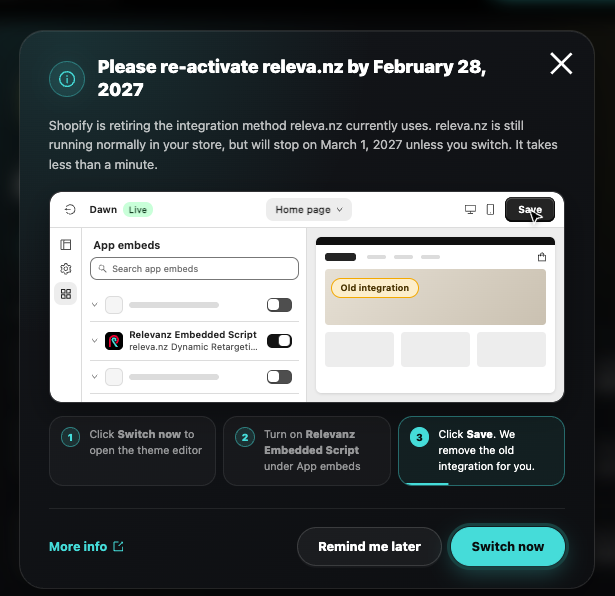
Shopify is discontinuing the current releva.nz integration method on March 1, 2027. If a corresponding pop-up appears in your Shopify store, please follow the instructions provided to update the integration in time. The process takes less than a minute.
6. All Done!
You’ll now find the releva.nz App in your Shopify backend under:
Apps → releva.nz